
The map that draws itself.
For years we couldn't afford to document our own systems. So we stopped trying to — and let the code document itself.
Ask most engineering teams "where's the map of all our systems?" and you'll get a shrug, a stale wiki page, or someone who left two years ago. At Purple it was the shrug. We run somewhere around 210 systems — services, APIs, the machinery that moves money and runs the apps people log into every day. By hand, over a long stretch of good intentions, we had managed to properly write up 14 of them. Not fourteen percent. Fourteen. Mostly one thin page each.
Then, on a Tuesday in March, the map drew the rest of itself. In a single automated run, a service we call Landscape Forge produced full architecture documentation for 154 systems at once — about 224,000 lines of it — and it keeps refreshing them as the underlying code changes. The work nobody could afford to do by hand was just… done.
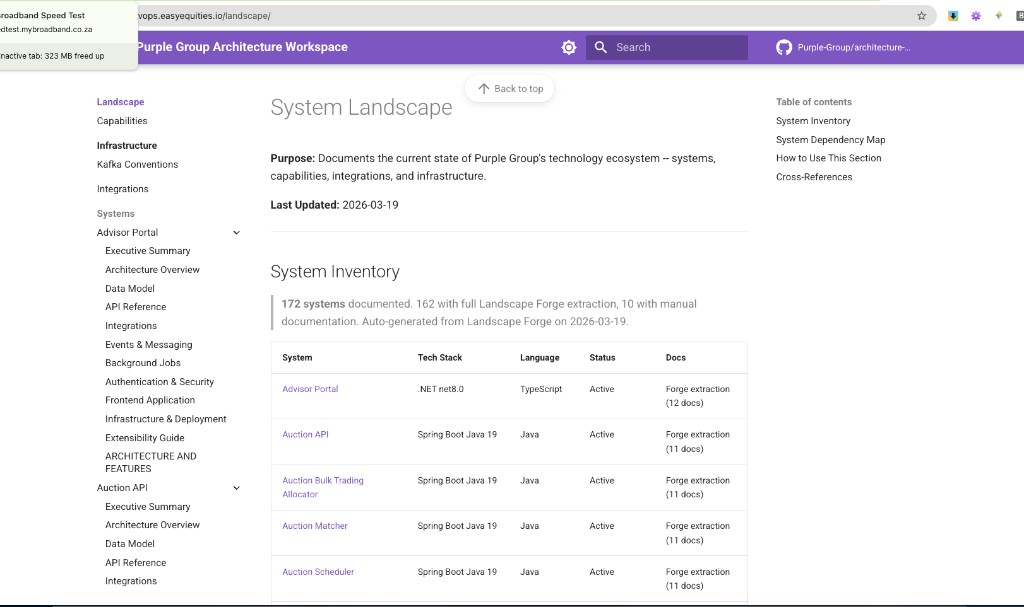
That's not a one-off snapshot, either. As of 19 March 2026 the live map documents 172 systems — 162 written automatically by Landscape Forge, 10 still kept by hand — and it has already re-documented systems on its own as their code moved on. You can go and look at it; we'll show you where in a moment.
That's the part worth sitting with, because it's the whole point: nobody maintains the map anymore. It maintains itself.
Why the map never got drawn
It's not that we didn't care. It's that documenting a real system properly is genuinely hard, slow work — and then it rots the moment the code moves on.
We actually measured it. Take one real, central system: a financial ledger service that sits squarely in the money path. To document it honestly from a cold start — read the code, map the data model, trace every flow and integration, draw the diagrams, sit with the owner to check it — is on the order of eight to twelve focused days for a senior engineer. Some systems are lighter; the heavy ones in the money path are heavier. Blend it across all ~210 and you land at roughly eight senior-days each.

Do that maths and the reason for the shrug becomes obvious. Documenting the whole estate by hand is on the order of R10 million even using our own people — and well into the tens of millions at market consultancy rates. For one engineer working alone it's the better part of a decade of calendar time. So it was never a project anyone could justify; it would have competed directly with actually shipping product, and lost, every single time.
And even if we'd somehow paid for it, it wouldn't have stayed true. Keeping an estate's documentation current as the code keeps changing is a treadmill no team ever funds. Which is exactly why we only ever managed 14.
That's the trap Landscape Forge walked straight out of. It didn't make the by-hand work cheaper. It made the by-hand work unnecessary.
How it actually works (for the curious)
Under the hood it's two separate products doing two separate jobs, and it's worth keeping them straight because they're easy to blur into one.
Two products, one living map
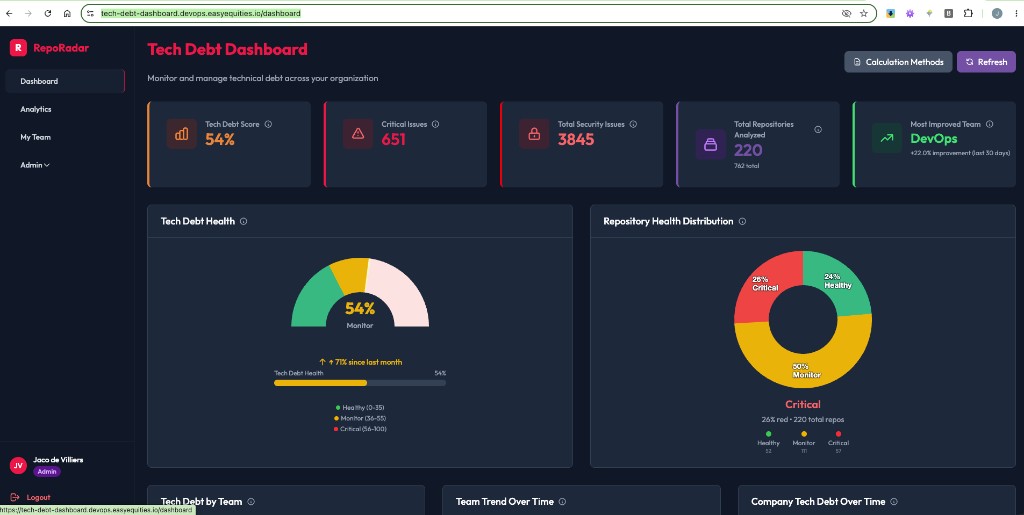
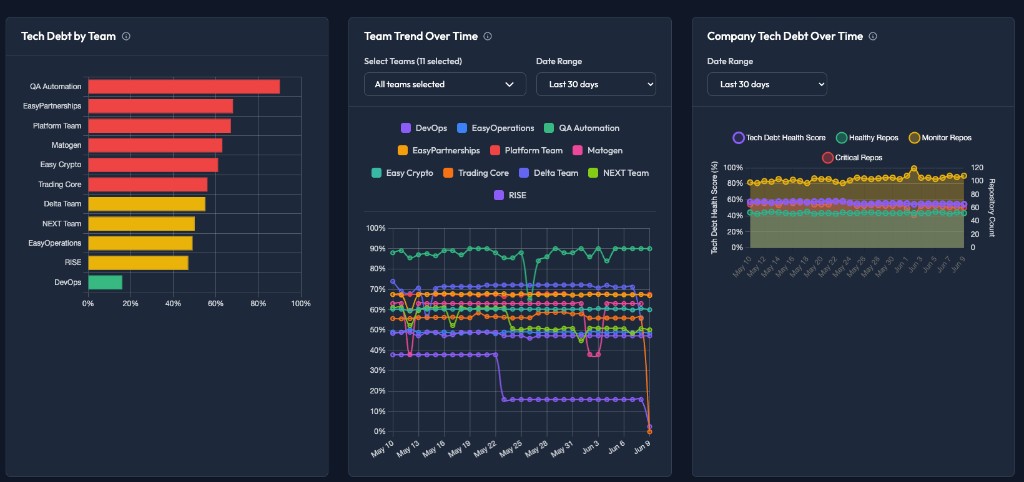
Repo Radar points; Landscape Forge writes. One knows the estate exists and what shape it's in; the other reads the code and explains it.

This isn't a mockup or a someday. Both are live right now — so don't take our word for it, go and look at your own systems:
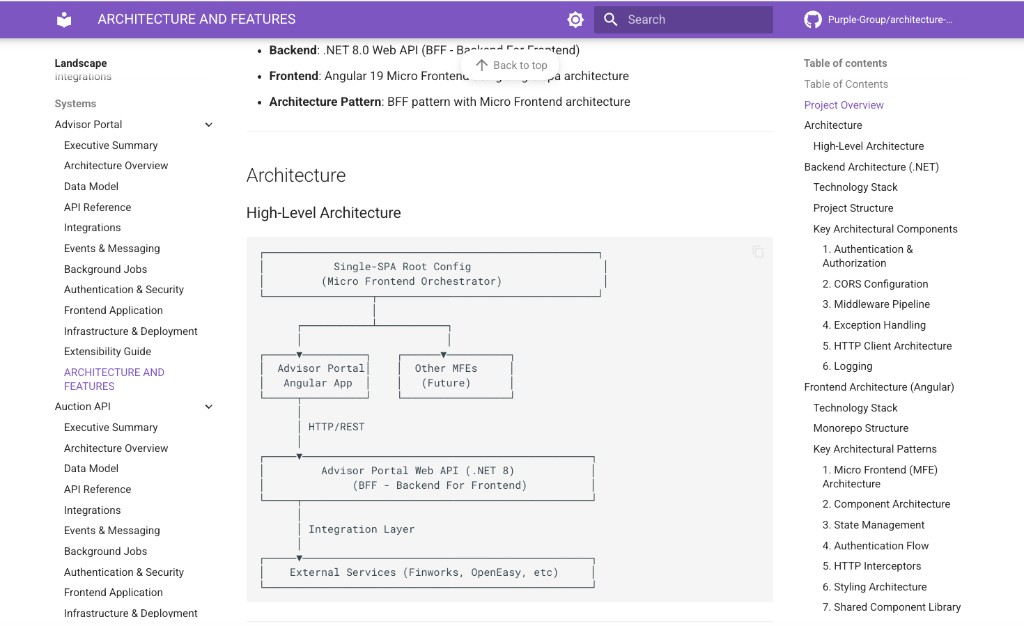
The obvious question is the one everyone asks about anything AI writes: is it any good, or is it confident nonsense? So we had a human architect grade the auto-generated output cold. The verdict was an A-minus — comprehensive, accurate, and (the part that genuinely surprised us) with honest, useful "known limitations" sections that flagged the real rough edges. The marks it lost were for filing and tidiness — where things were placed, schema hygiene — not for getting the systems wrong. That's a better grade than most hand-written docs would survive.
The thing we didn't go looking for
Here's the beat that turned a documentation project into something the security team cares about.
When you point a tool at every system you own and make it read the code carefully enough to explain each one, it doesn't just describe the architecture. It notices things. And it noticed some real, previously-unflagged holes.
One core service had been left with most of its endpoints completely unauthenticated — open doors nobody had clocked. A production identity service — exactly the kind of system you'd least want exposed — had database, mail and admin credentials sitting in a config file, with its cross-system access wide open on top of it. These weren't hypotheticals or lint warnings. They were real exposures, surfaced as a side-effect of the map simply doing its job.
The lesson stuck: the map you build to understand your estate is also a security scanner. You can't write an honest description of a system without noticing where it's unlocked. (For obvious reasons we're keeping the specifics in-house and the system names out of this — but the team that needed to know, knows.)
Where the map lives
The map isn't a PDF that ages in a drive. It's a living, browsable site — part of our Architecture Workspace, the home where the whole picture of how Purple is built comes together. You open it, you search, you click into a system, and you read the current truth about it. There's a good deal more to that home than the map — but that's an episode of its own, later in this series.
One honest note on "automatic"
We want to be straight about where this is, because the temptation is to oversell it. Today Landscape Forge runs automatically and refreshes the map in batches, with a bit of human cleanup on each run — and we've already watched it re-document systems on its own as their code changed, which is the proof that the "living" part is real and not a slide. The fully hands-off, set-it-and-forget-it version is the model we're finishing, not the one we're claiming. But make no mistake about what already exists: the map is live, it's accurate, and it documents 172 of our roughly 210 systems — the vast majority of the estate, up from fourteen pages and a shrug.
The leverage
We had a piece of essential infrastructure — an accurate, current map of every system we own — that was simultaneously critical and economically impossible. Critical because you can't safely change, secure, or reason about what you can't see. Impossible because by hand it cost on the order of R10 million of our own people's time, took the better part of a decade, and then went stale. Automation didn't shave a percentage off that cost — it collapsed the category, and handed security a list of real exposures as a bonus. The question to carry forward: what else are we choosing to live without simply because the by-hand version is too expensive to ever start?
You can finally see
If you've ever inherited a system nobody could explain, or burned a week reverse-engineering something just to make one safe change — this is for you. The map is live now. Search for a service and read an honest, current account of what it is and how it fits, without hunting down the one person who used to know. And you don't have to keep it up to date — the code keeps the map honest, automatically, so the version you open is the version that's true today.